Session recaps
D&D session recap generator
Upload the recording of the session you just played and get back a recap of what happened, plus a linked wiki of every person, place, and plot thread it mentioned. You review it before any of it becomes canon.
Published by RollSummary. Meet Julio Cesar, the developer.
Nobody at the table wants to be the one taking notes. The game master is running six things at once, the players are busy playing, and the notes written at 1am the next day are six rushed lines that make sense to nobody by session twelve. A recording keeps everything, but nobody listens to four hours of it again.
RollSummary sits between the two. It reads the recording for you and writes the short version: what happened, who was there, and what the party will chase next. This page covers what the recap contains, how a session gets from your phone to a finished recap, what happens after it, and what it costs.
What the recap contains
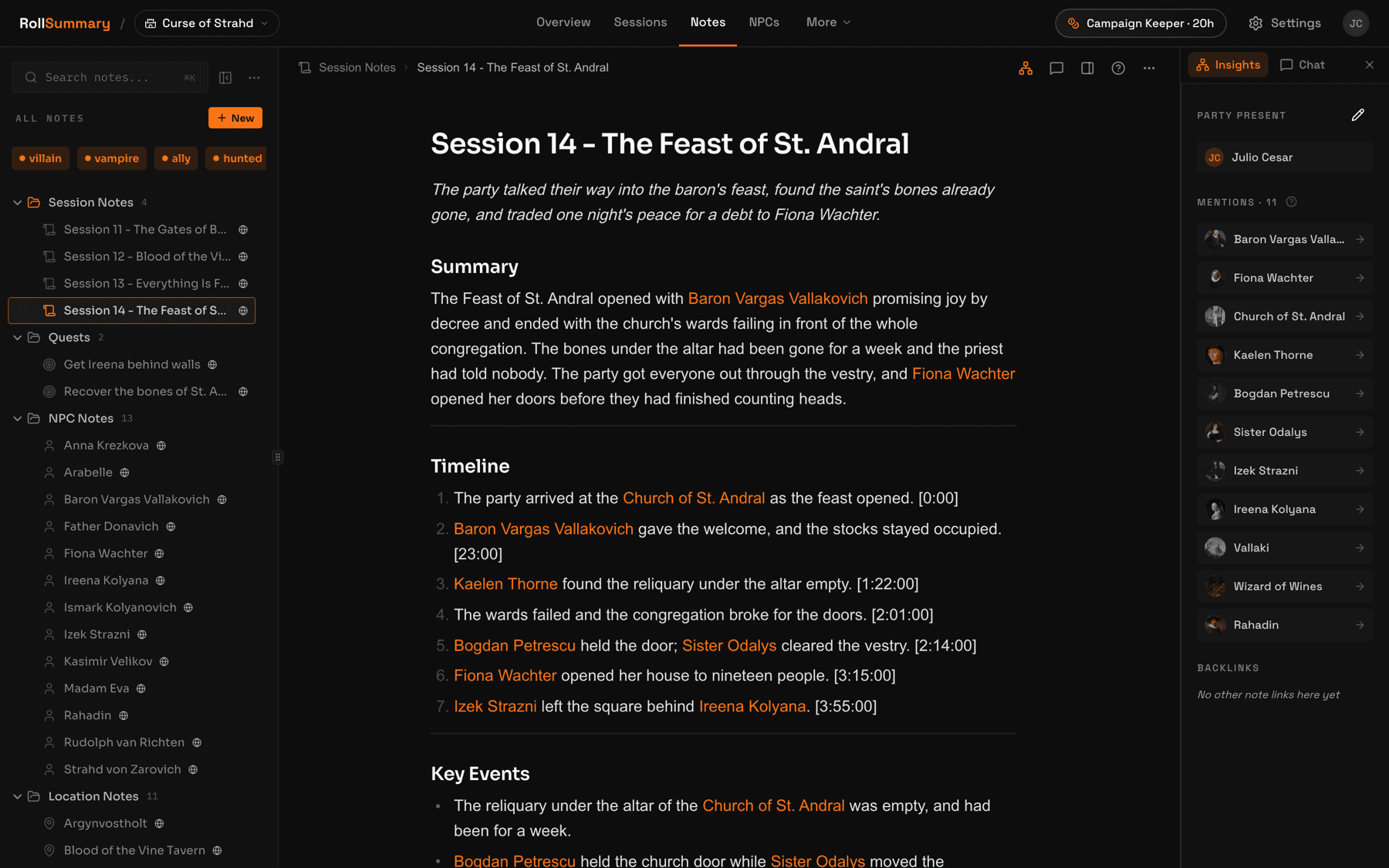
Every recap follows the same structure, so you always know where to look. It opens with a short TL;DR of the night and a summary, then a numbered timeline of what happened, each beat stamped with the moment in the recording it came from. After that come the key events, the decisions the party made, the questions left open, who was there, and what the party will chase next.
Alongside the recap you get the full transcript, with speaker labels and timestamps, so when someone asks what exactly the innkeeper said, you can find the line instead of arguing about it. Everyone your table met and everywhere they went is linked from the recap to its own note.
- A TL;DR you can read aloud at the start of the next session
- A timeline of the night, each beat with a timestamp from the recording
- Key events, decisions, open questions, and the party's next moves
- The full transcript with speaker labels, searchable afterwards
How it works: record, upload, review
There are three steps, and only the first one happens during the game.
Record the session. Around a real table, a phone in the middle of the table is enough. RollSummary has no Discord bot, so an online table records the call with a tool of its own. Our guide to recording a D&D session covers each setup in detail: in person, on Discord, and on a virtual tabletop.
Upload the file. Open your campaign, click New Session, and choose the recording. MP3, WAV, OGG, M4A, MP4, MKV, MOV, and WebM all work, up to 1 GB, and the file is converted to a compact audio format in your browser before it is uploaded. Once the upload finishes, processing runs in the background, so you do not have to keep the page open.
Review what comes back. The recap and every proposed note arrive as drafts. You approve, edit, or reject each one, fix a misheard name, and cut anything that did not happen. Nothing enters your campaign until you say so.
How to summarize a D&D session
If you would rather write the summary yourself, the shape that works is the same one the generator uses. Start with two or three sentences on what the night was about. Then list the events in the order they happened, keeping only the ones that changed something. Note every new name, whether a person, a place, or an item, and spell it the way the table agreed to spell it. Finish with what the party wants to do next and the questions still open.
Write it within a day, while you still remember who said what. Keep it short enough to read aloud in a minute, because that is how it will actually get used at the start of the next session. And keep the names in one place, so that by session twenty you are not hunting through old notes for the blacksmith's daughter.
That is exactly the work RollSummary does from the recording. The difference is that it never misses a session, and every name it finds becomes a note you can link to.
After the recap: a wiki of your campaign
The recap is the first thing you read. The wiki is what you keep. Every NPC, location, and plot thread the session mentioned becomes a note of its own, linked to the others with backlinks, so the innkeeper's note shows every session she appeared in and the town's note links to the people tied to it.
As the campaign goes on, later sessions add to the notes you already have instead of starting new ones, and a plot thread is updated when the party makes progress on it. A name you corrected once is passed to the transcription step for later sessions, so it tends to stay fixed. Binding a character to a player adds the player's real name to that character's aliases, so your friend at the table does not turn into an NPC in the wiki.
Every proposed change is a draft until the game master approves, edits, or rejects it. That is the point of the review step: the tool suggests, and the table's canon stays yours. Players join free with an invite link to read the recaps and browse the wiki, and you choose which notes they can see.
When you want the campaign somewhere else, export it as an Obsidian vault: one markdown file per note, with frontmatter and wiki-links, on every plan.
Long sessions and other languages
A four hour session is the normal case, not the edge case. It comes back as a recap in about ten minutes, and a single recording can run up to 12 hours, so a long one shot or an all day game fits in one upload.
RollSummary detects the language your table speaks from the recording, across more than 30 languages, including Spanish, Portuguese, French, German, Polish, Japanese, and Korean. The transcript, the recap, and every note are written back in that same language. There is no language to pick.
What it costs
You can try it without paying. Verifying your email starts a 30 day trial with 6 session hours, no card required, and when the trial ends you keep one free session of up to 90 minutes with its recap and wiki. Campaigns, players, and notes are unlimited and free on every plan.
Paid plans are measured in hours of recording, not in sessions or campaigns. Tavern Scribe is $10 a month for 6 hours, Campaign Keeper is $25 for 20 hours, which covers a weekly four hour table, and Dungeon Master is $49 for 40 hours. Paying for a year costs ten months' price. Pay as you go credits that never expire are there for the month you play more than usual.
If you stop paying, nothing disappears. Your recaps, notes, and wiki stay readable and editable, and only new transcription and recaps pause until you subscribe again.
Questions GMs actually ask
Can I try this recap generator for free?
Yes. Verifying your email starts a 30 day trial with 6 session hours, no card required, and when the trial ends you keep one free session with its recap and linked wiki. For free options from other tools, see our roundup of D&D session recap tools.
How long does it take to generate a recap of a four hour session?
About ten minutes. Processing runs in the background after you upload, so you can close the page and come back. A four hour recording uses four hours of your plan's monthly session hours.
Does it work for in-person games and for Discord?
Both, as long as you have a recording. For an in-person game, record on a phone in the middle of the table and upload the file. RollSummary has no Discord bot, so a Discord table records the call with a tool of its own. RollSummary takes one file per session, so a recording with a separate track per speaker has to be mixed into one file first. Our guide to recording a D&D session covers both setups.
Does it work for Pathfinder and other tabletop RPGs?
Yes. Nothing in RollSummary is tied to a rules system. It works from what your table says, so a Pathfinder, Call of Cthulhu, or homebrew campaign gets the same recap and the same wiki as a D&D one.
What happens when the recap gets something wrong?
You fix it before it counts. The recap and every proposed note arrive as drafts, and you approve, edit, or reject each one before anything enters your campaign. A name you correct once is passed to the transcription step for later sessions, so the same name tends to come out right the next time.
Can it make a recap from a transcript I already have?
Yes. When you create a session, choose Paste a transcript instead of Upload a recording, then paste the text or drop in a .txt, .srt, or .vtt file. You get the same recap and wiki notes as from a recording. On a paid plan a pasted transcript counts as at most 30 minutes of session hours, however long it is.
Can my players read the recap?
Yes, for free. Players join your campaign with an invite link and read recaps and browse the wiki without paying. Only the account that generates the recaps, usually the game master, needs a plan, and you choose which notes your players can see.
Keep reading
- D&D session recap tools compared
Eleven tools that write the recap from your recording, compared on input, price, and export.
- How to record a D&D session
The step before this one: Discord, in person, or on a virtual tabletop, and how to ask the table first.
- How to transcribe a D&D session
If all you want is the text: the free and paid ways to transcribe a long session, with real prices.
- The best D&D note-taking apps
Where the notes live afterwards: eight tools, from Obsidian to the ones that write for you.
- Free Obsidian vault template
The vault an exported campaign drops into: the same six folders and frontmatter, with a template per folder for the notes you write yourself.
- RollSummary pricing
Session hours, storage, and what the free first session actually includes.
Try it on your next session
Upload the recording from the last night you played and read the recap before the next one. The first session is free, there is no card, and every note waits for your approval before it becomes canon.
We don't train on your sessions. Audio is deleted after processing unless you choose to keep it.