Guide
How to transcribe a D&D session
A session is four hours of five people talking over each other about places that do not exist. Most transcription tools were built for a thirty minute meeting about a budget. Here is what copes, what it costs for one session, and what you still have to do afterwards.
Published by RollSummary. Meet Julio Cesar, the developer.
At an unhurried 130 words a minute, four hours of talk is about 30,000 words. That is a short novel every week, and nobody at your table is going to read it. So the first thing to settle is why you want the transcript at all: to search for what the innkeeper actually said, to write a recap from, or to hand to something that writes the recap for you.
We make one of the tools on this page, so squint accordingly. To make that easy, every price and limit below was read from the vendor's own pricing page or documentation in November 2026 and the sources are listed at the bottom. Where an official page would not tell us something, the guide says so.
Why a game table breaks meeting transcribers
Length is the first wall. Otter's free plan stops at 30 minutes per conversation and allows three file imports in the lifetime of the account. Its Pro plan stretches to 90 minutes per meeting and only the Business plan reaches four hours. A normal session is longer than what most of these products consider a long meeting.
Crosstalk is the second. In a meeting people take turns. At a table three players react to a natural 1 at once, and a transcriber has to decide who said what. YouTube's own help page lists overlapping speakers as a reason automatic captions fail, alongside videos that are too long, which is a fair description of every session ever recorded.
Names are the third and the worst. Speech recognition is trained on real words, and your campaign is full of invented ones. Strahd becomes Strod, Vallaki becomes the lackey, and the wizard's name comes out differently every time it is spoken. The words around the name are fine, and the one word you will later search for is wrong.
Free and on your own machine: Whisper
Whisper is OpenAI's open-source speech recognition model, released under the MIT licence. It runs on your own computer, so the audio never leaves it, and it costs nothing but electricity. It is a command-line tool that needs Python and ffmpeg, and it writes the transcript as plain text, subtitle files, or JSON.
It comes in six sizes, from tiny to large, plus a faster turbo model that is the default. The size you can run depends on your graphics card: the README lists roughly 1 GB of video memory for the smallest models, about 6 GB for turbo, and about 10 GB for large. It will run without a graphics card, slowly, and four hours of audio is a long time to wait on a laptop processor.
What Whisper does not do on its own is tell speakers apart. Its documentation describes no speaker labels, so you get one unbroken stream of text. WhisperX, a maintained open-source project built on top of it, adds word-level timestamps and speaker labels. The price is more setup: a CUDA toolkit if you want the graphics card to do the work, and a free Hugging Face account and access token for the speaker model.
This is the right route if you are comfortable in a terminal and privacy matters more than convenience. Speakers come back as numbered labels rather than names, and nothing in the toolchain knows a player from a character.
Meeting and podcast tools: Otter, Descript, Rev
Otter is the one most people try first. The free Basic plan gives 300 minutes a month with the 30 minute cap, which rules out a session. Pro is $16.99 a user per month, or $8.33 on the annual plan, with 1,200 minutes, 90 minutes per meeting, and ten file imports a month. Business is $30 a month, or $19.99 annually, and is the first plan that takes a four hour recording in one piece.
Descript is an audio and video editor that transcribes as a side effect, which makes it a good fit for a table that publishes an actual play. The free plan includes one media hour a month. Hobbyist is $24 a month, or $16 billed annually, for 10 media hours, and Creator is $35, or $24 annually, for 30. It can transcribe a multitrack recording with each speaker on their own track, and exports the transcript as .docx, .txt, .rtf, .md, or .html.
Rev sells human transcription at $1.99 a minute. For a four hour session that is $477.60, which is the right price for a published show and the wrong one for a weekly home game. Its machine transcription comes with a subscription: a free plan with 45 minutes a month, then $29.99 a seat per month for 5,000 minutes.
All three return a transcript and stop. None of them has heard of an initiative order.
If you write code: the speech APIs
Speech recognition is also sold directly, by the minute, and the prices are startling next to a subscription. Deepgram lists its Nova-3 model for pre-recorded audio at $0.0043 a minute, which is $1.03 for four hours, with $200 of free credit to start and speaker labels billed as an add-on. AssemblyAI lists $0.21 an hour plus $0.02 an hour for speaker labels, about 92 cents for the same session, with a free tier of up to 185 hours.
What you get back is JSON, not a document. You write the script that uploads the file, turns the response into something readable, and stores it. If that sounds like a pleasant Sunday, this is the cheapest reliable way to transcribe a campaign. We use Deepgram ourselves for the transcription step, as our privacy policy says.
The recorder you already used
Check what your recorder can do before paying for anything else. Craig, the Discord recording bot, includes transcripts on its $8 a month Patreon tier, delivered as WebVTT, SRT, or plain text. If the recording is already there, that is one less upload.
Phones transcribe too. Voice Memos shows a transcript on an iPhone 12 or later in a short list of languages, and Google's Recorder on a Pixel transcribes on the device, though its speaker labels are US English only. Both are built for a memo, not a four hour table, so treat the result as a search aid.
Uploading the recording to YouTube as a private video and downloading the automatic captions is the classic free trick. It works sometimes. YouTube's help page warns that captions may never appear for a long video or for overlapping speakers, and tells you to review whatever you get.
A transcript is not notes
Suppose every tool above worked perfectly. You now own 30,000 accurate words a week, and the question you had on Thursday, what did we promise the dragon, is somewhere in the middle of them. A transcript is the raw material. The thing you wanted was the recap, the list of names, and the two decisions that mattered.
RollSummary is built around that second step. You upload the audio or video and get the transcript with speaker labels and timestamps, and it proposes which speaker is which member of your party. The names already in your campaign, including any spelling you have corrected before, are passed to the recognition step, so a name you fixed once tends to stay fixed. It detects the language your table speaks from the audio, across more than 30 languages, and writes everything back in it.
Then it writes the notes: a structured recap with a TL;DR, the key events in order, and the open threads, plus a wiki note for each person, place, and quest, linked to each other. Nothing is saved until you approve it. The transcript stays searchable afterwards, and the GM's campaign chat can quote the exact moment something was said, with its timestamp. A four hour session takes about ten minutes.
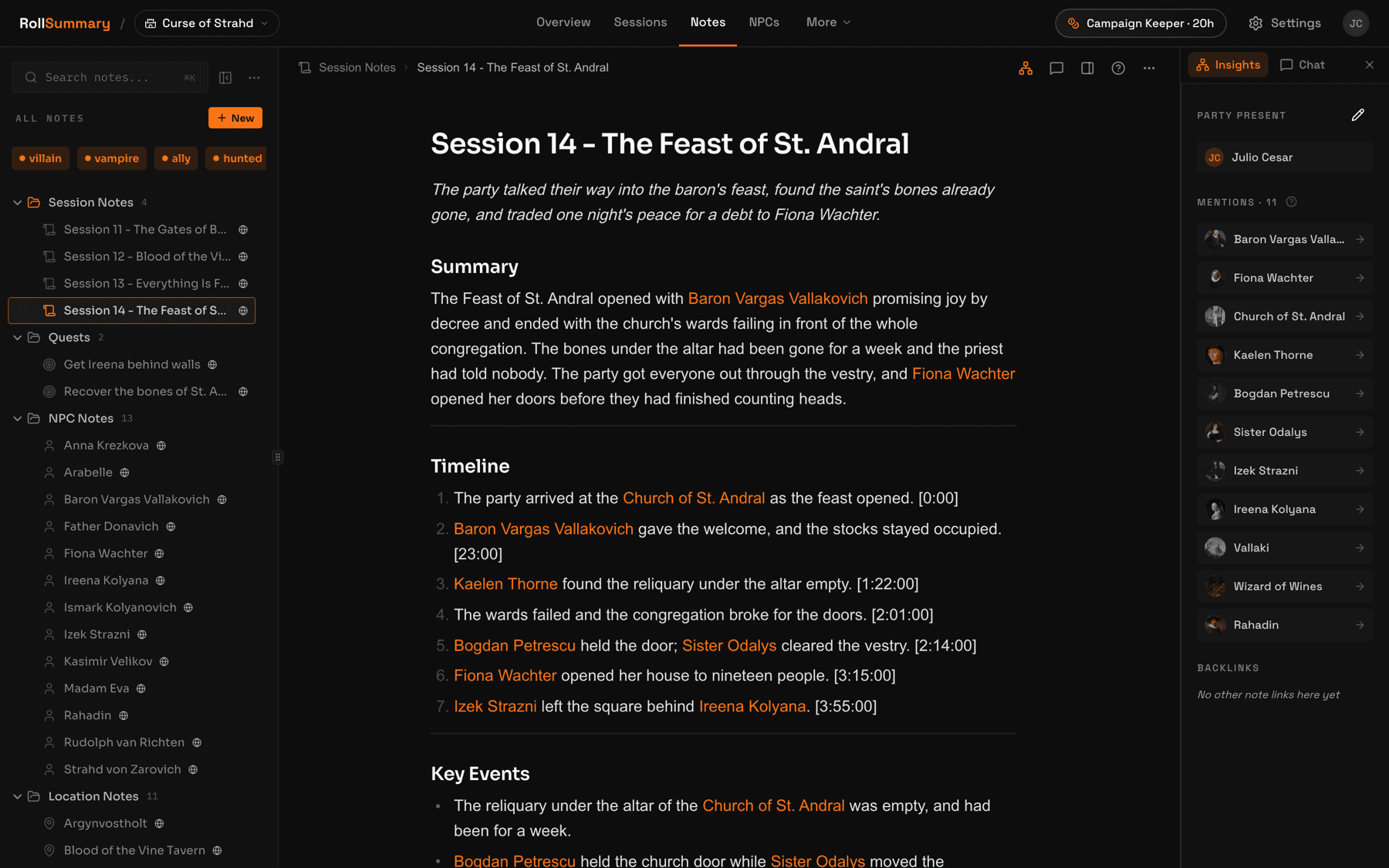
The name problem no transcriber solves on its own
Listen to any table and count which names get said. It is the player's real name, far more often than the character's: somebody asks Renan to roll, not Thoradin. A transcript faithfully records that, and anything that builds notes from the transcript now believes a person called Renan is in the dungeon.
A plain transcriber cannot fix this, because nothing in the audio says who plays whom. It takes knowledge of your table. In RollSummary, binding a character to a player adds that player's name to the character note's alias list, so both names resolve to the same sheet, and the step that writes notes is told that a party member is always a player character and never an NPC.
If you are transcribing by hand or with a general tool, the cheap fix is a habit. Keep a short list of who plays whom at the top of the document, and when you search later, search both names.
Pick by what you want at the end
Seven lines. Find the one that describes you and skip the rest.
- You want the raw text, you own a decent graphics card, and you do not mind a terminal: Whisper, or WhisperX for speaker labels. Free.
- You recorded on Discord with Craig and want the text from the same place: Craig's $8 a month tier.
- You publish an actual play and edit the audio anyway: Descript.
- You need a transcript accurate enough to print, and you have a budget: Rev's human transcription at $1.99 a minute.
- You write code and want to build your own pipeline: Deepgram or AssemblyAI, about a dollar a session.
- You only want to find one quote from last week: your phone's built-in transcript, or YouTube's captions if they appear.
- You do not actually want a transcript, you want to know what happened: a tool that writes the recap, such as RollSummary.
Most tables that start with a transcript end up wanting the last line. That is not a sales pitch so much as arithmetic: the transcript is the long version of a thing you needed the short version of.
The options, side by side
Entry price is the cheapest way to get one four hour session through the tool. Every figure was read from the vendor's own pages in November 2026.
| Tool | Entry price | Best for | Notes from a recording | Export |
|---|---|---|---|---|
| Whisper | Free, runs locally | Privacy, and people at home in a terminal | Text with no speaker labels | txt, vtt, srt, tsv, json |
| WhisperX | Free, runs locally | Local transcripts with speaker labels | Text with numbered speakers | Files on your own disk |
| Craig transcripts | $8/mo on Patreon | Tables already recording on Discord | Transcript of the recording | WebVTT, SRT, plain text |
| Descript | $24/mo, 10 media hours | Actual plays that get edited | Transcript inside an editor | .docx, .txt, .rtf, .md, .html |
| Deepgram or AssemblyAI | About $1 a session | People who write their own scripts | Raw transcript data | JSON from an API |
| RollSummary | First session free, then $10/mo | Wanting the notes, not the text | Transcript, recap, and linked notes | Obsidian vault zip, every plan |
Questions GMs actually ask
Can I transcribe a D&D session for free?
Yes, with effort. Whisper is free and open source and runs on your own computer, and WhisperX adds speaker labels on top of it. Both need a terminal and ideally a graphics card. Otter's free plan caps each conversation at 30 minutes and Descript's free plan covers one media hour a month, so neither fits a full session. RollSummary's first session is free with no card.
How long does it take to transcribe a four hour session?
On a hosted service, minutes. RollSummary returns the transcript, the recap, and the notes for a four hour session in about ten minutes. Running Whisper locally depends entirely on your hardware: quick on a recent graphics card with the turbo model, and a long wait on a laptop processor.
Can a transcriber tell which player is speaking?
Some can tell speakers apart, which is called diarization, and label them Speaker 1, Speaker 2, and so on. Whisper's documentation describes none. WhisperX, Deepgram, and AssemblyAI all offer it. Recording one track per person, as Craig does on Discord, sidesteps the problem. Turning a numbered speaker into a named player is a separate step, and RollSummary proposes that mapping for you to confirm.
Why does the transcript get my character names wrong?
Speech recognition is trained on real words, and invented fantasy names are not among them, so it substitutes the nearest thing it knows. Tools that let you supply a vocabulary do better. RollSummary feeds the names already in your campaign, and any spelling you have corrected, into the recognition step for every later session.
How much does it cost to transcribe one session?
Between nothing and a few hundred dollars. Whisper is free. A speech API such as Deepgram or AssemblyAI is about a dollar for four hours. Subscriptions run from $8 a month for Craig's transcript tier to $30 a month for the Otter plan that accepts a four hour recording. Human transcription from Rev at $1.99 a minute comes to $477.60.
Is my table's audio private when I transcribe it?
Only a local tool like Whisper keeps the audio entirely on your machine. Any hosted service receives the recording, so read its policy and ask your players first. RollSummary uses the recording only to transcribe and summarize the session, deletes it after processing unless you choose to keep it, and does not train on your sessions.
What should I do with the transcript once I have it?
Search it when you need an exact quote, and otherwise turn it into something shorter. A recap of the key events, a list of the people and places that came up, and the threads left open are what you will actually reread before the next session. You can write those by hand from the transcript or use a tool that drafts them for your review.
Every limit and price on this page was read in November 2026. Limits and prices move, so check the source before you rely on one: github.com/openai/whisper, github.com/m-bain/whisperX, otter.ai/pricing, descript.com/pricing, rev.com/pricing, deepgram.com/pricing, assemblyai.com/pricing, craig.chat/supporter, Apple: Voice Memos transcription, Google: Recorder speaker labels, YouTube automatic captions.
Keep reading
- How to record a D&D session
The step before this one: Discord, in person, or on a virtual tabletop, and how to ask the table first.
- D&D session recap tools compared
Every tool that goes past the transcript and writes the recap, compared on input, price, and export.
- The best D&D note-taking apps
Where the notes live afterwards: eight tools, from Obsidian to the ones that write for you.
- RollSummary pricing
Session hours, storage, and what the free first session actually includes.
Try it on your next session
Upload the recording from the last night you played and see what comes back. The first session is free, there is no card, and the transcript, the recap, and every note wait for your approval before anything becomes canon.
We don't train on your sessions. Audio is deleted after processing unless you choose to keep it.