Buyer's guide
The best D&D session recap tools in 2026
Eleven tools will listen to your session and write the recap for you. They differ far less in the writing than in three plain things: how the audio gets in, what they charge for, and whether you can ever get your campaign back out.
Published by RollSummary. Meet Julio Cesar, the developer.
This category has filled up fast. There are now AI note takers that join the voice channel, phone apps that sit on the table, and services that take whatever file you already recorded. Most roundups rank them by vibes. This one sorts them by the questions that decide whether a tool fits your table at all.
We make one of the eleven, so read with the appropriate squint. To keep ourselves honest, every price, limit, and feature below was read from the vendor's own site in November 2026, never from a review, and where a vendor's pages did not answer a question we say it was not listed rather than guessing. Several of these tools beat us on price or on features, and the page says which.
Start with how you play, because it eliminates half the list. A table on Discord can let a bot do the recording. A table in a living room needs an app or a file upload. And if you already record with Craig or a phone, you want a tool that takes a file and does not care where it came from.
Archivist: the one that does nearly everything
Archivist has the widest reach in the category. Sessions come in through its own Discord bot, an audio upload, an in-person recording, pasted notes or transcripts, play-by-post history, and a Foundry VTT module on paid plans. What comes out is a recap with adjustable tone and length, a wiki of characters, items, locations and factions, a timeline, a quest log, and a chat over the campaign that also answers inside Discord and Foundry.
Pricing counts sessions: $10 a month for 1 campaign and 4 sessions, $20 for 3 and 10, $35 for 5 and 20, and $60 for 10 and 40, with extra sessions at $2. The trial is 30 days with no card, covering 1 campaign and 2 sessions. Its FAQ lists campaign export as an Obsidian vault, markdown files, or HTML, plus transcript downloads, and states that audio is deleted after transcription and never used for training.
If you want one tool for a Discord or Foundry table and the campaign limit suits you, this is the benchmark the rest are measured against.
Recap Raven: recaps for the players, feedback for the GM
Recap Raven is a Discord bot with an unusual split: a player-safe recap posted in the channel, and private feedback and analytics for the GM on paid plans. It records through its own bot, or imports a Craig recording or a transcript. Transcripts come labelled by speaker, even on the free plan.
The free plan is real and recurring: 5 sessions in your first 30 days, then 2 every 30 days, up to 3 hours each. Premium starts at $8.99 a month for 5 sessions of up to 6 hours, and Premium + Memory, from $13.99, adds a searchable campaign memory with NPC, quest and open-hook tracking. Its bot announces the recording in text and with a voice cue, which is the most careful consent behaviour we found, and its privacy page says raw audio is deleted within minutes of transcription.
Crit Scribbler: the generous free bot
Crit Scribbler lives entirely in Discord and has the most generous free tier of the bots: 4 sessions a month with recaps, funny quotes, comprehensive notes, and transcript downloads. Paid plans add character images and DM notes, at $10 a month for 16 sessions, $15 for the World Builder tier, and $42 for unlimited sessions.
It is lighter than the others by design. We found no wiki or entity tracking on its site, and no input other than the bot. Its privacy policy says transcripts are used to create summaries and to improve the service, and it carries no explicit promise about model training, so read it if that matters to your table.
Bardkeeper: pay per session, no subscription
Bardkeeper is a Discord bot that sells sessions in packs instead of a monthly plan. The first 2 sessions are free with no card. After that, during its open beta discount, one session is $1.99 and a pack of 4 is $5.99, listed at $3.99 and $11.99 without the discount.
You get transcripts in a dashboard, narrative summaries with shareable links, and notes on NPCs, factions, locations and quests with relationship mapping. It says session data is never used for training and audio is deleted immediately after processing. We found no export described on its site, and no documented way to upload a file you recorded elsewhere.
SessionKeeper: a recorder for the phone on the table
SessionKeeper is built around recording in its own apps on iOS, Android and the web, which makes it a natural fit for in-person tables. A Discord bot is included from the Hero plan up, and audio upload works on any plan. It has the lowest monthly price here: $3.99 for summaries on 1 active campaign.
The campaign wiki starts at the $9.99 Hero plan with 2 active campaigns, and the $24.99 Legendary plan adds a party-wide assistant and a podcast-style analysis of each session. Speaker identification uses a voiceprint with opt-in consent. We found no free tier and no export listed on its site.
Loreify: one flat price for unlimited sessions
Loreify is the simplest to budget for. $15 a month, or $120 a year, covers unlimited sessions, and a $7 Casual plan covers up to 2 sessions a month with every feature included. All plans start with a 7 day trial.
Audio comes in by upload, by recording in the app, or through Discord commands. Notes are sorted into NPCs, quests, loot, lore and combat, with an interactive lore map of how they relate and a chat over the result. Its pricing FAQ says you can still view and export your notes after cancelling, without naming a format.
GM Assistant: pay by the hour, export everything
GM Assistant does not record anything. Its own FAQ tells you to use your phone, Craig, or OBS and upload the file, up to 4 GB and 10 hours. That honesty carries through the pricing, which is by the hour of audio with no subscription required: $1.20 an hour for a brief write-up or $2.00 for a comprehensive one, with credits that never expire. Subscriptions start at $9 a month, and the first session is free.
It returns a recap, a scene outline, memorable moments, and the NPCs, locations and items that came up. Speaker labels appear when you upload multi-track audio such as a Craig recording. Export is the best on this list: notes as markdown, HTML, YAML or a Homebrewery document, and transcripts as plain text, SRT, VTT or JSON. For a table that plays irregularly, it is hard to beat.
DM Scribe: a real free tier and cheap hours
DM Scribe takes a file upload in almost any audio or video format, records in the browser, or records in its phone apps, with sessions up to 8 hours. It has no Discord bot and says so, pointing Discord tables at Craig's merged single-track download instead.
The free plan gives 2.5 transcription hours every month plus 3 bonus hours at signup. $7.99 a month buys 10 hours and $14.99 buys 30, with extra hours at $0.99. You get a timestamped transcript, a recap, a self-building wiki, and a question box that cites its sources, with export to plain text and markdown.
Two things to know. Its FAQ states there is no speaker diarization, so the transcript does not say who spoke. And its privacy policy says audio, transcripts and wiki entries stay until you delete them. It does not train its own models on your content, and makes no promise on behalf of its model provider.
Scrybe Quill: the recap you play out loud
Scrybe Quill's signature is a narrated audio or video recap, with a chosen narrator voice and music, made to play at the start of the next session. You upload a recording of up to 1.5 GB and also get four written recap variants, a session outline, iconic quotes, a shareable page, and a self-updating wiki.
There is no subscription. One recap is free on signup, then $20 buys 5 and $40 buys 12. Recordings are deleted immediately after transcription and its policy rules out training on your data in capital letters. We found no download formats listed beyond the share page and the narrated recap.
Saga20: speaker-aware summaries and a polished wiki
Saga20 records in its mobile app or takes one MP3 or M4A file per session, up to 400 MB and seven hours. Summaries come with voice recognition and speaker labels, and feed an auto-updating wiki with shareable campaign pages, character sheets, and interactive maps. Its Discord bot posts summaries and does not record.
One session summary is free. Plans are $12.99 a month for 6 sessions, $19.99 for 12 with campaign chat, and $39.99 for 24. Uploaded audio is deleted immediately after processing and nothing is used for training. We found no export described on its site.
RollSummary: a wiki you review and can take with you
This is ours, so here are the limits first. RollSummary takes a file upload and nothing else: no Discord bot, no phone app that records, and no Foundry module. Archivist, Recap Raven, and SessionKeeper all beat us on ways in.
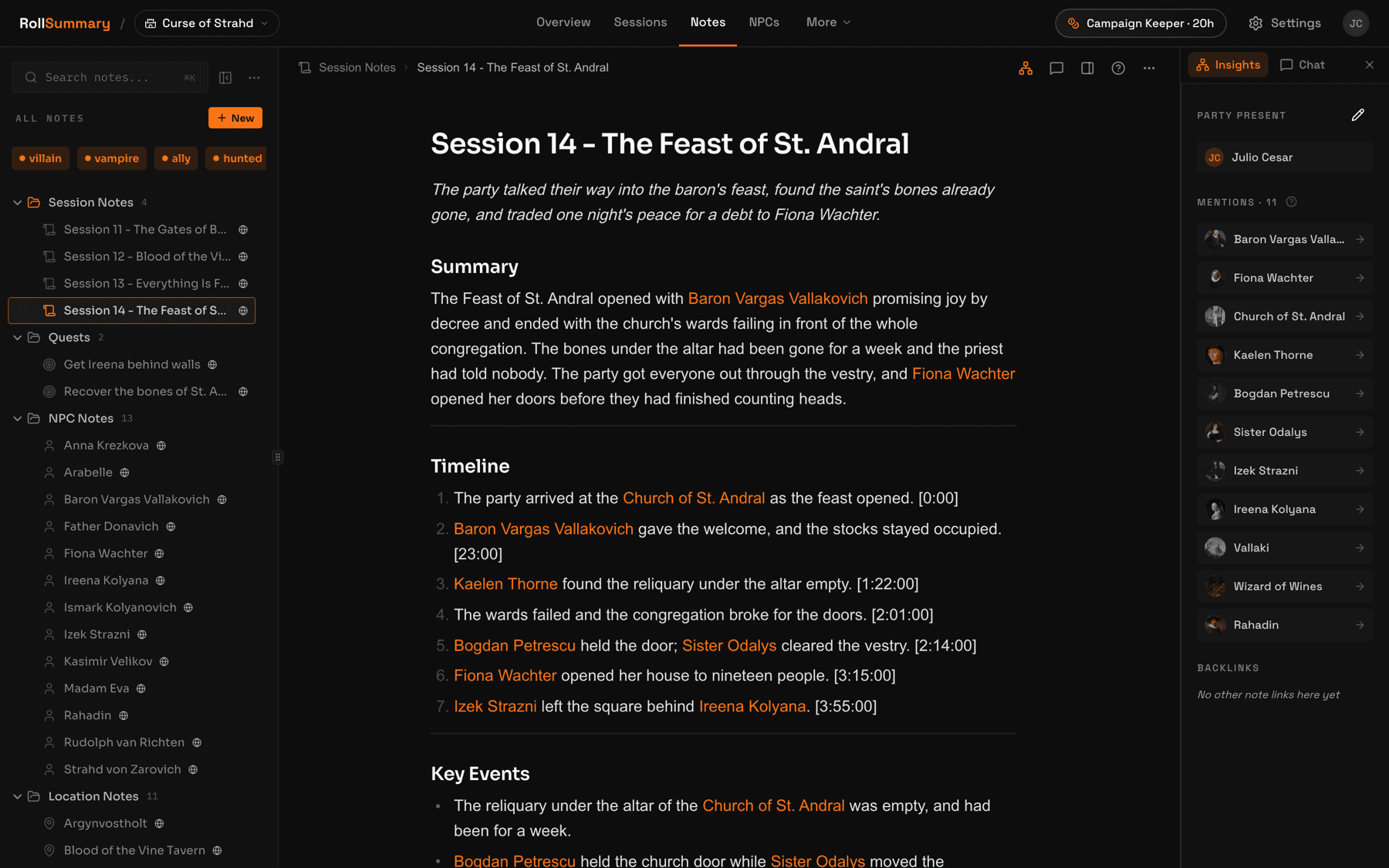
What you get for an uploaded audio or video file is a transcript with speaker labels and timestamps, a structured recap, and a wiki note for every person, place, and quest, linked to each other with backlinks and a local graph. The difference we care about is the review step: every proposed note is a draft until you approve, edit, or reject it, so the tool never quietly rewrites your canon. It detects the language your table speaks, across more than 30, and writes in it.
Plans count hours of audio, not sessions or campaigns: $10 a month for 6 hours, $25 for 20, and $49 for 40, with unlimited campaigns, notes, and players on every one. The first session is free with no card. Export is an Obsidian vault zip with frontmatter and wiki-links, on every plan and for every player.
- Audio or video in, transcript, recap, and linked notes out
- Every proposed change reviewed by you before it becomes canon
- Obsidian vault export with frontmatter and wiki-links, on every plan
- Players read recaps and browse the wiki for free
Three more worth knowing
Threadfall transcribes live, in the browser, while you play, with speaker labels, and adds GM prep tools on its higher tiers. It is free for 2 trial recaps, then $10 a month for 3 recaps.
Bardlog offers free recording and transcription with no session cap, labelled by speaker and timestamped, for Discord and Foundry tables, and charges only for optional summaries through small prepaid packs. In November 2026 it was in open beta with a waitlist.
Kazkar is a Discord bot with speaker identification, a narrative chronicle, and a lore graph. Its site shows only a free plan with 10 hours of recording and no published paid price.
The question to ask any of them
Ask what happens when your table says a player's name. People at a table use the player's real name far more than the character's, so the transcript is full of it. A tool that files names without knowing the difference creates an NPC page for your friend, and after ten sessions the wiki has a second, phantom party in it.
Tools handle this in different ways, and it is worth testing in your free trial rather than trusting anyone's marketing, ours included. Record one session, then look for a note with a player's real name on it.
RollSummary's answer is to tie the two names together. Binding a character to a player adds the player's name to that character note's alias list, the step that writes notes is told a party member is always a player character and never an NPC, and a wiki health screen lists any note that still matches a player's name and offers the merge.
Pick by how your table plays
Nine lines, one of which is probably yours. Read down until something fits.
- You play on Discord and want the bot to do the recording, with a deep wiki: Archivist.
- You play on Discord and want it free: Crit Scribbler for 4 sessions a month, or Recap Raven for 2 with speaker-labelled transcripts.
- You play now and then and hate subscriptions: Bardkeeper's session packs, or GM Assistant by the hour.
- You play in person and want to record on a phone app: SessionKeeper or Saga20.
- You already record with Craig or a phone and want the most hours for the money: DM Scribe.
- You want one flat price and never to count sessions: Loreify.
- You want a narrated recap to open the next session: Scrybe Quill.
- You want every export format there is: GM Assistant.
- You want to approve every note before it enters the wiki, and to keep the campaign as an Obsidian vault: RollSummary.
Nearly all of these have a free session or a trial, so the honest advice is to run the same recording through two of them. An hour of testing tells you more than any comparison page, including this one.
All eleven, side by side
Entry price is the cheapest way to start, which is often free. Every figure was read from the vendor's own site in November 2026.
| Tool | Entry price | Best for | Notes from a recording | Export |
|---|---|---|---|---|
| Archivist | From $10/mo, 4 sessions | Discord and Foundry tables that want it all | Recaps, wiki, timeline, chat | Obsidian vault, markdown, or HTML |
| Recap Raven | Free tier, paid from $8.99/mo | Player-safe recaps and GM feedback on Discord | Transcript by speaker, recap, scenes | PDF on Premium |
| Crit Scribbler | Free, 4 sessions/mo | A free, light recap inside Discord | Recaps, quotes, notes | Transcript download |
| Bardkeeper | 2 free sessions, then from $1.99 | Occasional Discord games, no subscription | Summaries and entity notes | None listed |
| SessionKeeper | From $3.99/mo | In-person tables recording on a phone | Summaries, wiki from $9.99 | None listed |
| Loreify | $7/mo for 2 sessions, $15 unlimited | A flat price for unlimited sessions | Sorted notes and a lore map | Offered, format not stated |
| GM Assistant | First session free, then $1.20/hour | Paying by the hour, no subscription | Recap, outline, NPCs, places, items | Markdown, HTML, YAML, SRT, VTT, JSON |
| DM Scribe | Free 2.5 hours/mo, paid from $7.99 | A real free tier and cheap hours | Timestamped transcript, recap, wiki | Plain text and markdown |
| Scrybe Quill | 1 free recap, then $20 for 5 | A narrated recap to play at the table | Written and narrated recaps, wiki | None listed |
| Saga20 | 1 free summary, then $12.99/mo | In-person tables wanting a shareable wiki | Speaker-labelled summaries, wiki | None listed |
| RollSummary | First session free, then $10/mo | A reviewed wiki you can take to Obsidian | Transcript, recap, and linked notes | Obsidian vault zip, every plan |
Questions GMs actually ask
What is the best AI note taker for D&D?
It depends on how the audio gets in. For a Discord table that wants a bot to record and a deep wiki, Archivist is the benchmark. For a file you already recorded, GM Assistant and DM Scribe are the best value, and RollSummary is the one built around reviewing every note before it is saved. For in-person recording on a phone app, look at SessionKeeper and Saga20.
Is there a free D&D session recap tool?
Several. Crit Scribbler's free plan covers 4 sessions a month inside Discord. Recap Raven gives 5 sessions in the first 30 days and then 2 every 30 days. DM Scribe gives 2.5 transcription hours a month. Bardkeeper's first 2 sessions, GM Assistant's first session, and RollSummary's first session are free with no card.
Crit Scribbler or Recap Raven?
Both are Discord bots with a free plan. Crit Scribbler is the more generous at 4 sessions a month and has a lighter style, with funny quotes and character images on paid plans, and no wiki that we could find. Recap Raven's free plan is 2 sessions every 30 days of up to 3 hours, with speaker-labelled transcripts, and its paid plans add private GM feedback and, on the Memory tier, NPC and quest tracking.
Which recap tools work for in-person games?
Any tool that accepts a file works if you record on a phone: GM Assistant, DM Scribe, Scrybe Quill, Saga20, Loreify, Archivist, and RollSummary all take an upload. SessionKeeper, Saga20, and DM Scribe also have their own recording apps. Crit Scribbler and Bardkeeper are built around a Discord bot, so they suit online tables.
Can I export my campaign if I leave?
Check before you commit a long campaign. In November 2026, Archivist listed Obsidian vault, markdown and HTML export, GM Assistant listed markdown, HTML, YAML and several transcript formats, DM Scribe listed plain text and markdown, and RollSummary exports an Obsidian vault on every plan. We found no export described on the sites of Bardkeeper, SessionKeeper, Saga20, or Scrybe Quill.
Do these tools train on my table's audio?
Most say no in writing. Archivist, Recap Raven, Bardkeeper, GM Assistant, Scrybe Quill, Saga20, SessionKeeper, and RollSummary all state that your content is not used for training. Crit Scribbler's policy says transcripts are used to improve the service, and DM Scribe says it does not train its own models while making no promise on behalf of its model provider. Read the policy of whichever you pick and ask your players first.
How accurate are generated session recaps?
Good enough to be worth editing, not good enough to publish unread. Invented names and overlapping speech are where every tool slips, and a recap can state a wrong detail with total confidence. Prefer a tool that shows you what it is about to save. RollSummary holds every note as a draft until you approve it, and a corrected name is remembered for later sessions.
Every price, limit, and feature on this page was read in November 2026. Limits and prices move, so check the source before you rely on one: myarchivist.ai/pricing, myarchivist.ai/faq, recapraven.com/pricing, critscribbler.com, bardkeeper.com, sessionkeeper.ai/pricing, loreify.ai/pricing, gmassistant.app/docs/faq, dmscribe.com/pricing, dmscribe.com/faq, scrybequill.com/pricing, saga20.com/pricing, thread-fall.com/pricing, bardlog.com/pricing, kazkar.ai.
Keep reading
- The best D&D note-taking apps
The other half of the question: Obsidian, Notion, Kanka, World Anvil, and LegendKeeper, for notes you write yourself.
- How to record a D&D session
Half these tools need a file. Here is how to make one on Discord, in person, or on a virtual tabletop.
- How to transcribe a D&D session
If all you want is the text: free local Whisper, meeting transcribers, and speech APIs, with real prices.
- RollSummary pricing
Session hours, storage, and what the free first session actually includes.
Try it on your next session
If the review step and the Obsidian export are what you were looking for, upload the recording from the last night you played. The first session is free, there is no card, and every note waits for your approval before it becomes canon.
We don't train on your sessions. Audio is deleted after processing unless you choose to keep it.